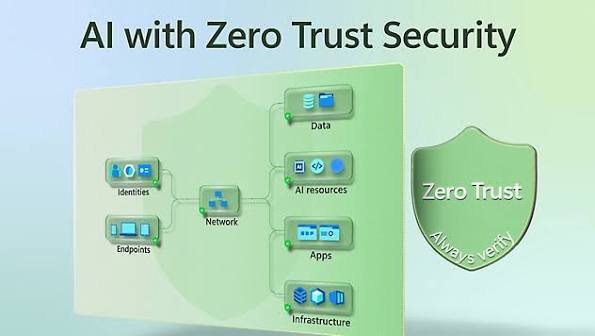
In today’s digital world, businesses rely on cloud platforms, remote employees, online applications, and interconnected systems to manage their daily operations. While these technologies make organizations more flexible and productive, they also create new security challenges. Employees may access company resources from different locations, applications exchange sensitive information across networks, and cybercriminals constantly search for weaknesses they can exploit.
Traditional security approaches often depend on the idea that users and devices inside a company’s network can be trusted more than those outside it. However, this assumption is becoming increasingly risky. A compromised employee account, an infected device, or a poorly secured application can give attackers access to systems that were never intended to be exposed.
This is where Zero Trust Security becomes important.
Zero Trust is a cybersecurity approach built around a simple principle: never automatically trust a user, device, or connection simply because it appears to be inside a trusted network. Every access request should be evaluated according to identity, permissions, device condition, resource sensitivity, and other relevant security signals.
For modern businesses, Zero Trust is not just another security technology. It is a practical way to reduce unauthorized access, limit the damage caused by compromised accounts, and protect valuable business information across cloud and on-premises environments.
In this article, we will explore how Zero Trust Security works, why businesses need it, and how organizations can implement it effectively without making everyday work unnecessarily complicated.
1. What Is Zero Trust Security?
Zero Trust Security is a security model that requires organizations to verify access requests instead of relying on automatic trust based on network location.
In a traditional network environment, employees connected to the corporate network might receive broad access to internal applications and services. If an attacker managed to compromise an employee’s credentials, that access could potentially become a starting point for further attacks.
Zero Trust takes a different approach. It assumes that threats may already exist inside or outside the organization’s environment. Therefore, every request to access a resource must be evaluated using appropriate security controls.
For example, an employee who signs in to a company application from a managed laptop may receive access after completing multifactor authentication. However, a request to access highly sensitive financial records might require additional authorization or a stronger authentication method.
The decision depends on the resource being accessed, the user’s permissions, the device’s security status, and the organization’s policies.
Zero Trust does not mean that employees must repeatedly prove their identity every few minutes or that every request should be blocked. Instead, it means that access is granted deliberately, limited to what is necessary, and reassessed when relevant conditions change.
The objective is to make unauthorized access more difficult while allowing legitimate users to work efficiently.
2. Why Traditional Security Models Are No Longer Enough
For many years, businesses relied heavily on perimeter-based security. Firewalls, network gateways, and other controls created a boundary between internal corporate systems and the public internet.
This approach still has value, but modern working environments have changed significantly.
Employees now work from home, travel between locations, use mobile devices, and access cloud-based applications. Business partners and contractors may also need access to specific systems. Meanwhile, applications communicate with APIs, databases, cloud services, and external platforms.
As a result, the idea of a clearly defined internal network is less useful than it once was.
A traditional security model can also create problems when an attacker obtains legitimate credentials. Once inside the network, the attacker may attempt to access additional systems or increase their privileges.
Consider a business that allows employees to access an internal file server after connecting to its corporate network. If a cybercriminal compromises an employee’s account and gains access to that network, poorly restricted permissions could expose confidential documents.
Zero Trust helps address this problem by evaluating access at the resource level rather than treating network access as proof of trust.
It also encourages organizations to limit permissions, verify devices, monitor activity, and restrict unnecessary communication between systems.
Traditional perimeter controls remain useful, but they should operate alongside identity-based security, access policies, and continuous monitoring.
3. The Core Principles of Zero Trust Security
A successful Zero Trust strategy is built on several connected principles. These principles guide how businesses manage identities, protect resources, and respond to changing security conditions.
Verify explicitly
Organizations should authenticate and authorize access using relevant information about the user, device, application, and requested resource.
Depending on the situation, this may involve multifactor authentication, device health checks, location signals, or additional verification for sensitive actions.
The purpose is to make access decisions based on evidence rather than assumptions.
Apply least-privilege access
Users and applications should receive only the permissions required to perform their responsibilities.
For example, a marketing employee may need access to customer campaign data but not to payroll records or production server administration.
Limiting permissions reduces the potential damage if an account or device becomes compromised.
Assume a breach
Zero Trust encourages organizations to prepare for the possibility that an attacker has already gained access somewhere in the environment.
This means limiting unnecessary connections between systems, monitoring important activity, protecting sensitive data, and preparing effective incident response procedures.
The objective is to prevent a single compromised account or device from becoming a much larger security incident.
Continuously evaluate risk
Access decisions should reflect relevant changes in circumstances.
A device that becomes compromised, an account showing suspicious behavior, or a sudden attempt to access an unusually sensitive resource may justify additional verification or restricted access.
Continuous evaluation does not require identical checks for every action. Controls should be proportionate to the risk.
Together, these principles help businesses build a security environment in which access is controlled, permissions are limited, and suspicious activity can be identified more effectively.
4. How Zero Trust Security Works in Practice
Zero Trust is implemented through a combination of identity management, device security, access policies, network controls, and monitoring.
When a user requests access to an application, the organization first verifies the user’s identity. It then evaluates whether the user is authorized to access the requested resource.
Additional checks may examine whether the device is managed, whether required security updates are installed, and whether the request matches the organization’s access policies.
Based on this information, the system allows access, requests further verification, restricts the session, or denies the request.
For example, imagine an employee accessing a customer relationship management system from a company-managed laptop.
The organization may require multifactor authentication, confirm that the employee belongs to the appropriate department, and verify that the device meets security requirements.
If the employee later attempts to access a sensitive administrative function, a separate authorization check may be required.
If suspicious activity is detected during the session, the organization may revoke access or require the user to authenticate again.
This approach reduces reliance on a single successful login as proof that every subsequent action is safe.
Zero Trust also applies to non-human identities. Applications, automated workflows, APIs, and cloud services need controlled permissions and secure authentication mechanisms of their own.
A well-designed implementation combines these controls without forcing users to navigate unnecessary security obstacles.
5. The Role of Identity and Access Management
Identity is one of the most important components of Zero Trust Security.
Organizations need to know who is requesting access, which resources they are allowed to use, and whether their permissions remain appropriate.
Identity and Access Management (IAM) systems help businesses manage user accounts, authentication, roles, and authorization policies across applications and services.
Multifactor authentication is a particularly valuable control because it requires an additional form of verification beyond a password. Phishing-resistant authentication methods, such as appropriately implemented passkeys or hardware security keys, can provide stronger protection against credential theft.
Single sign-on can also improve usability by allowing employees to authenticate through a central identity provider. However, the identity provider itself must be protected carefully because compromising it could affect access to multiple applications.
Businesses should regularly review user permissions, remove accounts that are no longer required, and promptly revoke access when employees leave or change roles.
Privileged accounts deserve special attention. Administrative access should be limited to authorized personnel and protected with stronger controls, including separate administrative identities and privileged access management where appropriate.
Organizations should also manage service accounts and machine identities. Unnecessary long-lived credentials and excessive permissions can create serious risks even when human accounts are well protected.
Strong identity management gives Zero Trust a reliable foundation by making access decisions more consistent and easier to audit.
6. Implement Least-Privilege Access Across the Business
One of the most practical ways to strengthen security is to reduce the number of people and systems that have access to sensitive resources.
In many organizations, permissions accumulate over time. Employees change departments, temporary projects end, and applications receive additional privileges to support new features. Without regular reviews, these permissions may remain active long after they are needed.
Least-privilege access addresses this problem by limiting permissions to specific responsibilities.
For example, a software developer may need permission to modify code and deploy applications to a testing environment. That does not automatically mean the developer should have unrestricted access to production databases or customer records.
Similarly, a finance employee may need to approve payments but should not necessarily have permission to modify the systems that generate payment records.
Businesses can implement least privilege through role-based access control, attribute-based policies, privileged access management, and regular access reviews.
Temporary or just-in-time access can provide another layer of protection. Instead of giving an administrator permanent access to a sensitive system, the organization can grant elevated permissions for a limited period when a legitimate task requires them.
Permissions should also be reviewed for applications and automated services, not just employees.
The result is a smaller attack surface and fewer opportunities for an attacker to exploit excessive privileges after compromising an account.
7. Protect Devices Before Granting Access
Even a legitimate user account can create risks if the device being used to access company resources is compromised.
A laptop infected with malware, a mobile device without important security updates, or an unmanaged computer shared with other people may expose business information.
Zero Trust strategies therefore consider device security when making access decisions.
Organizations should maintain an inventory of devices, establish minimum security requirements, and use endpoint management tools to monitor compliance.
Depending on the environment, requirements may include supported operating systems, current security patches, endpoint protection, disk encryption, and appropriate screen-lock settings.
A company may allow employees to access general business applications from a compliant device while restricting access to highly sensitive systems from unmanaged endpoints.
Device checks should be integrated with identity and access policies so that authentication alone does not determine whether access is appropriate.
Businesses should also plan for lost or stolen devices. Remote lock and wipe capabilities, secure authentication, and controlled access to corporate data can reduce the potential impact.
Bring Your Own Device (BYOD) programs require particular care because organizations must balance business security with employee privacy.
A practical Zero Trust strategy does not necessarily require every employee to use the same device. It requires clear rules about which devices can access which resources and under what conditions.
8. Use Network Segmentation to Limit the Impact of Attacks
Zero Trust is not limited to verifying users. It also involves controlling how systems communicate with one another.
In a poorly segmented network, a compromised workstation may be able to reach servers, databases, and administrative interfaces that have no legitimate reason to communicate with it.
Network segmentation reduces these unnecessary connections by separating systems according to their purpose, sensitivity, or operational requirements.
For example, a business may separate employee devices from production infrastructure, isolate sensitive databases, and restrict administrative interfaces to approved management systems.
Microsegmentation takes this concept further by applying more specific communication policies between workloads, applications, or services.
Cloud environments can use security groups, network policies, private connectivity, and identity-aware access controls to achieve similar goals.
However, segmentation should be designed around actual business requirements. Excessively restrictive rules can interrupt legitimate application communication and create operational difficulties.
Teams should map important data flows, identify necessary connections, and test policy changes before enforcing them broadly.
When implemented correctly, segmentation can prevent attackers from moving freely between systems and help contain security incidents.
It also supports the Zero Trust principle of assuming a breach by reducing the amount of access available after an initial compromise.
9. Secure Cloud Applications and Remote Access
Cloud adoption and remote work have made secure access more complicated for many businesses.
Employees may use software hosted by third-party providers, access internal applications through browsers, and connect to company systems from different locations.
A traditional virtual private network can provide secure connectivity, but network access alone should not automatically grant broad permission to internal resources.
Zero Trust Network Access (ZTNA) offers an alternative approach by providing controlled access to specific applications based on identity, device status, and policy.
Rather than placing a user directly onto a broad corporate network, a ZTNA solution can limit access to the applications that the user is authorized to use.
Organizations should also secure cloud identity permissions, restrict public exposure of sensitive services, and monitor changes to cloud configurations.
For software-as-a-service applications, businesses should review authentication settings, sharing permissions, administrator roles, and data retention policies.
Third-party access deserves similar attention. Contractors and business partners should receive limited permissions and should not retain access after their work is complete.
Remote access policies should be consistent across locations without assuming that a connection from an office is automatically safe.
The goal is to make access secure and predictable regardless of where employees work or where applications are hosted.
10. Protect APIs and Machine-to-Machine Communication
Modern business applications frequently communicate through APIs and automated services. These connections may process customer information, exchange financial records, or trigger important business operations.
If machine identities are poorly secured, attackers may use stolen credentials or excessive permissions to access sensitive systems.
Zero Trust principles should therefore apply to every application and service that requests access to another resource.
Organizations should use secure authentication methods, issue credentials with limited scope, and avoid sharing privileged credentials across unrelated services.
Where appropriate, short-lived tokens and workload identity mechanisms can reduce the risks associated with long-lived secrets.
APIs should enforce authorization for individual operations and resources rather than assuming that a successfully authenticated service is permitted to perform every action.
For example, an order-processing service may need permission to read customer shipping information but should not automatically receive unrestricted access to payment administration functions.
Organizations should also validate incoming data, monitor unusual API activity, and apply suitable rate limits.
Machine-to-machine access should be documented and reviewed regularly. Unused service accounts, obsolete API keys, and unnecessary permissions should be removed.
These measures help extend Zero Trust beyond employee logins to the interconnected systems that support modern business operations.
11. Combine Zero Trust With Continuous Monitoring
Access controls help prevent unauthorized activity, but no security model can guarantee that every threat will be blocked.
An employee account may be compromised, a device may become infected, or an attacker may exploit a vulnerability that was not previously known.
Continuous monitoring helps organizations identify suspicious behavior and respond before the impact becomes more serious.
Security teams can collect relevant information from identity providers, endpoints, cloud services, applications, and network infrastructure.
They can then look for unusual activity, such as repeated authentication failures, unexpected privilege changes, unusual data transfers, or access to resources outside a user’s normal responsibilities.
Security Information and Event Management systems can help correlate events from multiple sources, while endpoint detection and response tools provide visibility into activity on supported devices.
Zero Trust policies can use relevant security signals to trigger additional verification, restrict access, or revoke a session when justified.
However, monitoring systems may generate false positives, and legitimate business activity can sometimes look unusual.
Organizations should establish clear investigation procedures and ensure that security alerts are reviewed by people or automated workflows with appropriate safeguards.
Continuous monitoring makes Zero Trust more effective by allowing organizations to respond when risk changes rather than relying exclusively on the initial access decision.
12. Common Challenges When Implementing Zero Trust
Although Zero Trust provides important security benefits, implementation can be challenging.
One common problem is complexity. Businesses may operate a mixture of legacy applications, cloud services, on-premises systems, and third-party platforms. Not every system supports modern authentication or detailed access policies.
Organizations may need to modernize certain applications, introduce identity integrations, or use additional controls to protect older systems.
Another challenge is excessive restriction. If access policies are introduced without understanding how employees and applications work, legitimate business processes may be interrupted.
Poorly configured controls can also create alert fatigue or lead employees to seek unauthorized workarounds.
Incomplete visibility is another obstacle. Businesses cannot apply effective access policies if they do not know which applications exist, what data they contain, or which systems communicate with one another.
Cost and skills can also affect implementation. Some tools require specialized knowledge, ongoing administration, and integration with existing infrastructure.
To manage these challenges, organizations should avoid attempting a complete transformation overnight.
A phased rollout, supported by accurate asset inventories, clear ownership, pilot testing, and regular reviews, is generally more practical than deploying restrictive policies across the entire environment at once.
The objective is to reduce risk steadily while maintaining the reliability and usability of business systems.
13. A Practical Step-by-Step Zero Trust Implementation Plan
Businesses do not need to replace every existing security system to begin adopting Zero Trust. They can start with a focused set of improvements and expand as their capabilities mature.
Step 1: Identify critical assets
Create an inventory of important applications, sensitive information, privileged accounts, cloud resources, and business-critical systems.
Prioritize resources that would cause the greatest financial, operational, or reputational damage if compromised.
Step 2: Strengthen identity security
Enable multifactor authentication, protect administrator accounts, remove unnecessary permissions, and establish reliable processes for onboarding and offboarding users.
Where possible, prioritize phishing-resistant authentication for privileged and high-risk access.
Step 3: Review device security
Define minimum security requirements for devices that access company resources. Use endpoint management and security tools to identify devices that do not meet those requirements.
Establish clear rules for unmanaged devices and personal equipment.
Step 4: Apply least privilege
Review access permissions for users, applications, and automated services. Remove unnecessary privileges and introduce temporary elevated access where appropriate.
Step 5: Restrict unnecessary connections
Map important network and application communication paths. Introduce segmentation and resource-specific access policies to reduce unnecessary connectivity.
Step 6: Introduce continuous monitoring
Collect relevant security events, define alert priorities, and establish incident response procedures.
Ensure that suspicious activity can be investigated and that access can be revoked when necessary.
Step 7: Test and improve
Begin with a limited group of applications or users. Measure the effect on security and productivity, correct policy problems, and expand gradually.
This approach allows organizations to make measurable progress without creating unnecessary disruption.
14. How Small Businesses Can Adopt Zero Trust
Zero Trust is often associated with large enterprises, but small businesses can benefit from its principles as well.
Smaller organizations may have limited budgets and fewer dedicated security professionals. However, they can still make meaningful improvements by focusing on a few high-impact controls.
First, enable multifactor authentication for email, cloud administration, financial applications, and other important services.
Second, remove unnecessary administrator privileges and ensure that employees only have access to the information required for their jobs.
Third, keep operating systems, applications, and business devices updated. Use reputable endpoint protection and establish secure procedures for lost devices.
Fourth, review cloud sharing settings and ensure that sensitive files are not publicly accessible without a legitimate reason.
Fifth, protect business email accounts and verify unusual payment requests through an independent communication channel.
Small businesses should also maintain reliable backups and test whether critical data can be restored.
Many cloud providers and identity platforms already offer features that support Zero Trust principles. Organizations can begin with available capabilities before investing in more specialized products.
The most important factor is consistency. A small business that manages identities carefully, limits permissions, and responds quickly to suspicious activity can significantly improve its security posture.
15. Measuring the Success of a Zero Trust Strategy
Implementing Zero Trust is not a one-time project. Organizations need to determine whether their controls are reducing risk and supporting secure business operations.
Useful measurements include the percentage of important accounts protected by multifactor authentication, the number of excessive permissions removed, and the proportion of critical applications covered by appropriate access policies.
Businesses can also track the number of unmanaged devices accessing sensitive systems, the time required to revoke access when an employee leaves, and the time needed to investigate suspicious activity.
Other useful indicators include the number of privileged accounts, the frequency of access reviews, and the number of unnecessary network connections eliminated.
However, metrics should be interpreted carefully. A reduction in detected incidents does not necessarily mean that security has improved if monitoring coverage is incomplete.
Organizations should combine technical measurements with employee feedback and operational assessments.
If new access policies repeatedly interrupt legitimate work, the organization should investigate whether the policies are too restrictive or the underlying workflows need improvement.
Regular reviews help businesses adjust their approach as applications, employees, and threats change.
The ultimate goal is not to achieve a particular score. It is to reduce unnecessary trust, limit potential damage, and make access decisions more reliable.
Conclusion
Zero Trust Security offers a practical approach to protecting modern businesses in an environment where employees, applications, devices, and data are constantly connected.
By verifying access requests, enforcing least privilege, securing devices, controlling network communication, and monitoring suspicious activity, organizations can reduce their exposure to common cyber threats.
The value of Zero Trust lies in its ability to limit the consequences of compromised accounts and vulnerable systems. Instead of assuming that a user or device is safe because it has entered the corporate network, organizations evaluate access according to identity, permissions, context, and risk.
Successful implementation does not require businesses to transform every system at once. They can begin by strengthening identity security, reviewing privileges, protecting critical applications, and gradually expanding access controls.
It is equally important to maintain clear policies, involve employees in the process, and regularly evaluate whether security measures are working as intended.
Ultimately, Zero Trust is not about distrusting every employee or making access unnecessarily difficult. It is about replacing assumptions with verification and giving every user, device, and application only the access it genuinely needs.
When implemented thoughtfully, Zero Trust can help businesses protect sensitive information, improve resilience, and build a stronger foundation for long-term digital security.