Introduction
The internet has become an essential part of modern life. People use online platforms every day to communicate with friends, work remotely, study, shop, manage finances, and access information. From smartphones and laptops to smart home devices, digital technology has made life faster and more convenient than ever before.
However, with these benefits come new challenges. Online threats such as scams, identity theft, malware, data breaches, cyberbullying, and privacy violations have become common concerns for internet users around the world. This is why understanding online safety is more important than ever.
Online safety means protecting yourself, your personal information, your devices, and your digital identity while using the internet. It includes making smart decisions about the websites you visit, the information you share, the passwords you create, and the people you interact with online.
Many people believe that only large companies or technology experts need to worry about cybersecurity. In reality, every internet user can become a target. A single weak password, suspicious email click, or careless online action can create security problems.
The good news is that staying safe online does not require advanced technical knowledge. By learning basic online safety practices and developing responsible digital habits, anyone can reduce risks and enjoy a safer internet experience.
This complete guide explains everything you need to know about online safety, including privacy protection, secure browsing, password management, social media safety, online shopping security, and ways to recognize common cyber threats.
What Is Online Safety?
Online safety refers to the actions and practices people follow to protect themselves while using the internet. It covers personal security, privacy protection, safe communication, and responsible digital behavior.
The digital world connects billions of people, but it also creates opportunities for criminals who want to steal information, money, or online accounts. Online safety helps users identify dangers and take preventive steps before problems occur.
A strong online safety approach includes:
- Protecting personal information
- Creating secure passwords
- Using privacy settings
- Avoiding suspicious links
- Keeping devices updated
- Recognizing online scams
- Using secure networks
- Practicing responsible social media behavior
Online safety is not about avoiding the internet. It is about using technology wisely and confidently.
Why Online Safety Is Important
The internet stores and shares a large amount of personal information. Every time someone creates an account, sends a message, uploads a photo, or makes an online payment, digital data is created.
This information can be valuable to cybercriminals. They may attempt to access accounts, steal identities, or trick users through fake websites and messages.
Some major reasons why online safety matters include:
1. Protecting Personal Information
Personal information includes details such as:
- Full name
- Address
- Phone number
- Email address
- Financial information
- Login credentials
- Personal photos
If this information falls into the wrong hands, it can be misused for fraud or identity theft.
Practicing online safety helps users control what information they share and who can access it.
2. Preventing Identity Theft
Identity theft happens when someone uses another person’s personal information without permission. Criminals may use stolen information to create fake accounts, make purchases, or commit financial crimes.
Simple safety habits such as using strong passwords and avoiding suspicious websites can greatly reduce the risk of identity theft.
3. Protecting Online Accounts
Many people use the same password for multiple websites. This creates a serious security risk because if one account is compromised, others may also become vulnerable.
Using unique passwords and enabling extra security features helps protect important accounts.
4. Avoiding Online Scams
Online scams are designed to trick users into giving away money or information. Scammers often use fake emails, messages, websites, or social media profiles to appear trustworthy.
Learning how scams work is one of the best ways to avoid becoming a victim.
Common Online Threats Everyone Should Know
The internet contains many types of risks. Understanding common threats makes it easier to stay protected.
Phishing Attacks
Phishing is one of the most common online threats. It involves fake messages designed to steal sensitive information.
A phishing email may look like it comes from a bank, company, or trusted service. It may ask users to click a link, confirm account details, or enter a password.
Signs of phishing include:
- Unexpected requests for personal information
- Urgent messages creating panic
- Suspicious email addresses
- Spelling or grammar mistakes
- Links that do not match official websites
Before clicking anything, users should verify the source and avoid sharing sensitive information.
Malware
Malware is harmful software created to damage devices, steal information, or monitor user activity.
Common types of malware include:
- Viruses
- Spyware
- Ransomware
- Trojans
Malware can enter devices through unsafe downloads, infected websites, or suspicious attachments.
Keeping software updated and downloading files only from trusted sources can help prevent malware infections.
Weak Passwords
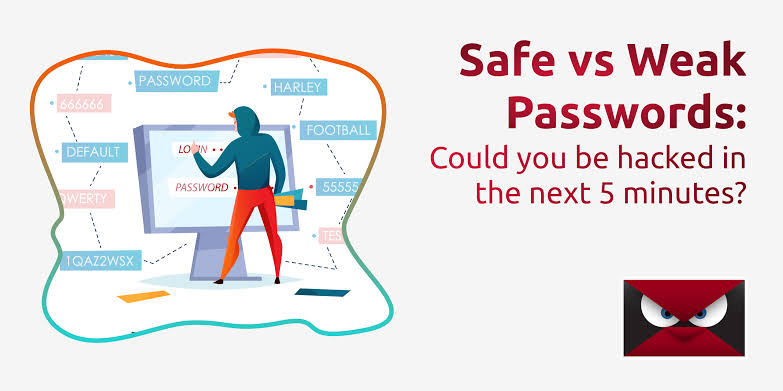
Passwords are the first line of defense for online accounts. Weak passwords make it easier for attackers to gain access.
Common weak password examples include:
- Simple number combinations
- Names
- Birth dates
- Common words
A strong password should contain a combination of letters, numbers, and symbols. It should also be different for every account.
Public Wi-Fi Risks
Public Wi-Fi networks are convenient, but they may not always be secure. Attackers can sometimes use unsafe networks to monitor activity or steal information.
When using public Wi-Fi:
- Avoid accessing sensitive accounts
- Do not make important financial transactions
- Use secure websites
- Consider using additional security tools
Creating Strong Passwords for Better Online Safety
Strong passwords are one of the easiest ways to improve digital security.
A good password should:
- Be long and difficult to guess
- Avoid personal details
- Use different characters
- Be unique for each account
Instead of creating a short password, users can create a memorable passphrase. A passphrase combines several unrelated words into a longer and stronger password.
For example, a phrase made from random words is usually safer than a simple dictionary word.
Using a password manager can also help people store and organize passwords securely without needing to remember every login.
The Importance of Two-Factor Authentication
Two-factor authentication (2FA) adds an extra layer of protection to online accounts.
With 2FA enabled, users need two types of verification:
- Something they know, such as a password
- Something they have, such as a phone verification code
Even if someone discovers a password, they may still be unable to access the account without the second verification step.
Many popular online services offer two-factor authentication as a security option, and enabling it is a simple but effective safety measure.
Safe Browsing Habits
Safe browsing means using the internet carefully and avoiding risky online behavior.
Good browsing habits include:
- Checking website addresses before entering information
- Avoiding unknown downloads
- Reading website privacy policies
- Using secure websites
- Closing suspicious pop-ups
- Keeping browsers updated
A website with secure connections usually uses HTTPS, which helps protect information exchanged between the user and the website.
Frequently Asked Questions (FAQs) About Online Safety
1. What is online safety?
Online safety refers to the practices and precautions people use to protect their personal information, devices, accounts, and privacy while using the internet. It includes using strong passwords, avoiding scams, protecting private data, and making responsible decisions online.
2. Why is online safety important?
Online safety is important because the internet contains risks such as phishing, identity theft, malware, scams, and privacy threats. By following online safety practices, users can protect their personal information, financial details, and digital accounts from unauthorized access.
3. How can I protect my personal information online?
You can protect your personal information by avoiding oversharing on websites and social media, using privacy settings, creating strong passwords, enabling two-factor authentication, and only sharing sensitive details with trusted platforms.
4. What makes a password strong and secure?
A strong password is long, unique, and difficult to guess. It should include a combination of uppercase letters, lowercase letters, numbers, and special characters. Avoid using common words, names, birthdays, or the same password for multiple accounts.
5. What is phishing and how can I avoid it?
Phishing is an online scam where attackers pretend to be trusted organizations or individuals to steal personal information. You can avoid phishing by checking email addresses, avoiding suspicious links, not sharing passwords, and verifying unexpected requests.
6. Is public Wi-Fi safe to use?
Public Wi-Fi can be convenient but may not always be secure. Avoid entering sensitive information, such as banking details or passwords, when connected to unknown public networks. Use secure websites and take extra precautions when using public internet connections.
7. How can I stay safe on social media?
To stay safe on social media, use strong passwords, enable privacy settings, avoid sharing personal details publicly, be careful with unknown friend requests, and think before posting information or photos online.
8. What should I do if my online account gets hacked?
If your account is hacked, change your password immediately, enable two-factor authentication, check account activity, remove unknown devices, and contact the platform’s support team if necessary.
9. How can I protect my devices from online threats?
You can protect your devices by keeping software updated, installing trusted security programs, avoiding suspicious downloads, using secure passwords, and regularly backing up important files.
10. How can beginners learn more about online safety?
Beginners can improve their online safety knowledge by learning about common internet threats, following cybersecurity tips, using trusted security resources, and developing safe digital habits when browsing, shopping, and communicating online.
Conclusion
Online safety has become an essential part of modern digital life. As more people use the internet for communication, education, shopping, banking, and entertainment, protecting personal information and online accounts is more important than ever. Cyber threats such as scams, phishing attacks, malware, and identity theft can affect anyone, but simple security practices can greatly reduce these risks. Using strong passwords, enabling two-factor authentication, avoiding suspicious links, and maintaining privacy settings are effective ways to stay protected. Online safety is not only about using security tools but also about developing smart digital habits. By staying informed and making careful choices, internet users can enjoy the benefits of technology with greater confidence. A safer online environment starts with individual responsibility, awareness, and continuous learning. Practicing online safety every day helps create a secure and positive digital experience for everyone.